
3.29 — New RTM Codes for 2026, Improvements & Bug Fixes Summary
New Features 🚀
-
RTM - Updated 2026 Setup Code 98975: Introduced updated system logic and UI to reflect CMS 2026 changes, allowing RTM setup to be billed after as few as 2 monitoring days within a 30-day period.
-
RTM - Added New RTM Codes 98985 and 98979: Added support for the new RTM billing codes across the system, enabling accurate tracking and billing readiness workflows for these services.
-
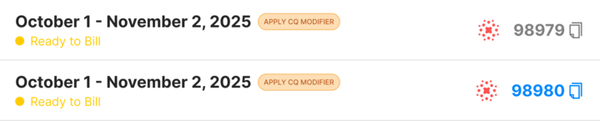
RTM Dashboard - Added Visual CQ Modifier Indicator: Billing users can now see an at-a-glance indicator showing when a CQ modifier may be required, helping ensure accurate and compliant billing without opening individual patient records.
-
RTM Dashboard - Added "No HEP" Tag: Patients who have visits but no Home Exercise Program assigned are now automatically tagged, making it easier for clinicians to identify and follow up with patients who need a program.

Improvements 🔧
-
RTM - Updated 2026 Treatment Code Logic: Enhanced billing logic for 98979, 98980, and 98981 to prevent conflicting or duplicate billing.
-
RTM - Enhanced 2026 Device Monitoring Code Handling: Improved logic for device monitoring codes 98985 and 98977 to accurately track short-month usage, enforce exclusivity rules, and automate billing readiness, supporting compliant and accurate revenue capture.
-
RTM Dashboard - Improved Location Filter Display and Tooltip: Active location filters are now displayed next to provider filters, with updated tooltip text clarifying that both providers and locations can be filtered.
-
RTM - Updated Live Interaction Terminology: All references to "live calls" have been updated to "live interactions", ensuring both remote and in-person encounters are recorded correctly.
-
Engage UI & PDFs - Improved Location-Specific Branding: When Engage is opened from Prompt, the interface and all generated PDF printouts now display the patient’s assigned location brand (logo and visual theme) instead of the group’s primary brand, ensuring accurate and consistent branding for each location.
-
Platform-wide Forms - Improved Drop-Down Usability: All existing drop-down fields now support search, making it faster to find and select values.
-
Web - UI Consistency Improvements: Improved layout, spacing, and alignment across multiple provider-facing screens, including login, patient profiles, parameters, exercises, and prescription flows, for a more consistent and polished user experience.
-
Web - Improved Provider Email Updates: Editing a provider’s email address no longer causes activity logs to display as missing or unavailable.
- Mobile Experience - Improved Account Activation UI: Addressed layout and responsiveness issues with mobile devices to improve patient account activation.
Bug Fixes 🐞
-
Email Notifications - Fixed Patient Name Display: Restored patient name visibility in email notifications so the patient’s first name displays correctly with the last name partially censored, instead of showing only masked characters.
-
Email Notifications - Fixed "View Message" Button: The button now opens the correct message as expected.
-
RTM - Fixed Incorrect Patient Profile Display: Monitoring logs and the RTM tray now consistently display the correct patient profile.
-
RTM - Fixed Timer Reset Issue: Total RTM time now accumulates correctly instead of resetting.
-
RTM Dashboard - Fixed Missing Live Interaction Indicator: The yellow phone icon now appears correctly for patients who require live interaction.
-
RTM - Prompt Integration - Corrected Treatment Notes Import: Fixed an issue where incorrect RTM documentation appeared in Prompt’s Treatment Notes field, ensuring the imported documentation accurately reflects RTM services provided.
-
Prompt Integration - Fixed Missing and Duplicate RTM Codes: Corrected issues where RTM codes were missing, incorrectly re-imported, or added with an incorrect CQ modifier.
-
Web - Fixed SMS Activation Link Display: Activation links sent via SMS no longer show placeholder text for patients with access to multiple groups.
-
Web - Fixed Custom Clinic Rewards Issues: Resolved crashes and image loading problems.
-
Provider Login - Fixed OTP Session Timeouts: Resolved an issue where providers were repeatedly logged out of the portal by extending OTP sessions to remain active for up to 6 days and ensuring OTP access expires only when the provider manually logs out.
-
Mobile Authentication - Fixed Face ID Login Issues: Resolved problems preventing Face ID from working correctly during login.
- Mobile - Fixed Messaging Layout Issues: Message text no longer overlaps the input box or appears cut off.