
3.32 — New Features , Fixes & Improvements | Release Notes
New Features 🚀
RTM related features:
-
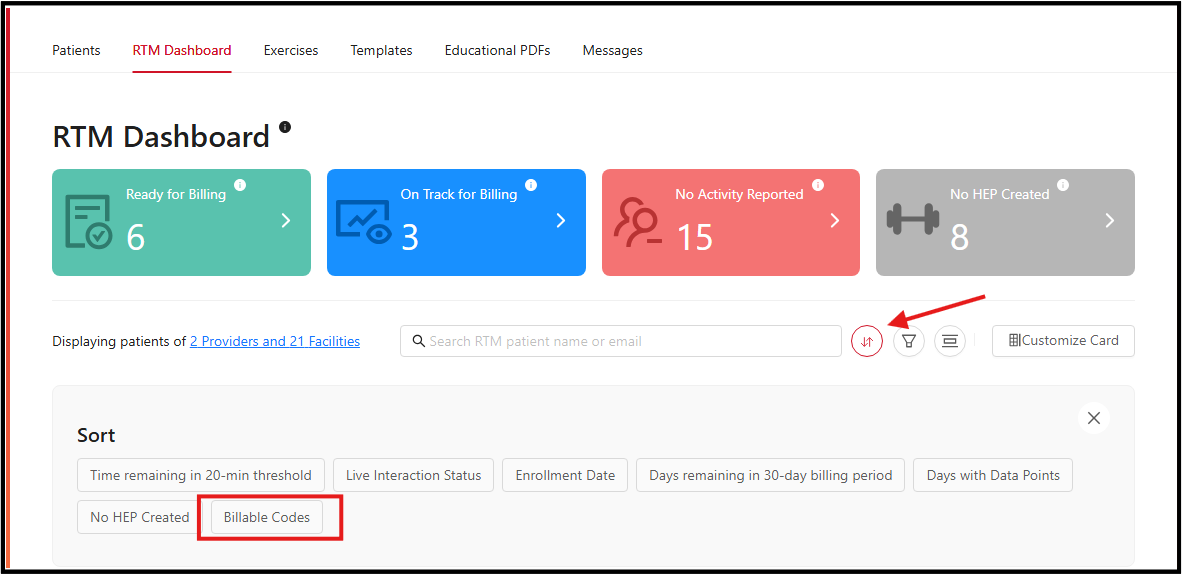
Sort by Number of Eligible Billable Codes - Added Patient Prioritization Sorting: Billing teams can now sort “Ready for Billing” patients by the number of eligible RTM billable codes and optionally view the count, making it easier to prioritize higher-value billing opportunities.
- Appointment Location Experience: Improved appointment location browsing with alphabetical sorting, state filtering, search functionality, and a simplified interface for easier navigation.
-
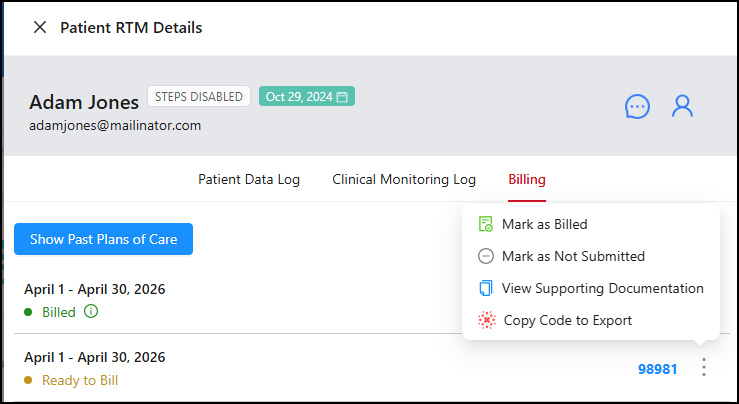
RTM Billing Controls: Added manual “Billed” and “Not Submitted” actions in the RTM Billing tab by replacing automatic billing status updates actions, giving providers greater control over billing status management and preventing unintended billing updates.
Others:
- Provider Alerts for System Issues: Added provider-facing alerts for Engage downtime and known issues, allowing providers to receive important updates directly within the portal through controlled pop-up notifications.
-
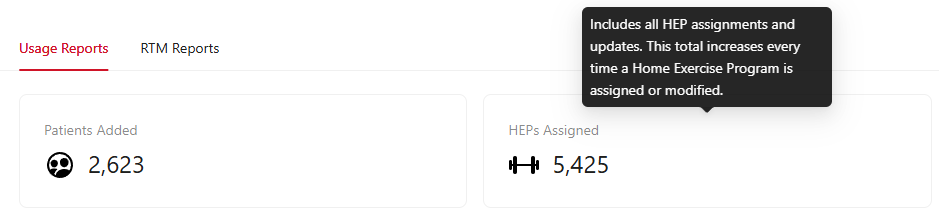
Reports Dashboard Guidance: Added tooltips to clarify how “HEPs Assigned” metrics are calculated, helping providers better understand the difference between total assignments and newly created prescriptions.
Improvements 🔧
- Improved Theme Readability - Text color in the yellow design theme has been updated from white to black to improve readability and accessibility across the interface.
- Accessibility Enhancements: Improved text readability and color contrast in highlighted sections to support accessibility compliance and improve visibility for clinics using green color theme in the mobile app.
- Privacy & Usability Update: Improved default HEP naming behavior by replacing patient-specific titles with a generic program title to better protect patient privacy and create more consistent naming conventions.
- Persistent Login Experience: Improved the patient login experience by preserving the previously selected group and profile after reopening the app, reducing repeated profile selection steps and allowing faster access to exercises and care plans.
- Messaging Provider Sync: Improved patient messaging threads to instantly reflect provider assignment and unassignment changes, ensuring conversations always display the patient’s current care team without requiring additional messages, refreshes, or re-login.
Sprint 3.31.1
- iOS Improved Activity Permission Guidance: Updated the intro sequence to better guide users in enabling activity tracking permissions for a smoother setup experience.
- Improved Profile Navigation Clarity: Profile selection now better reflects the active profile, reducing confusion when switching between group and sub-profiles.
- Improved Authentication Experience: Reduced unnecessary OTP prompts and enabled biometric authentication to bypass OTP where supported, while maintaining security.
- Improved Text Readability: Updated text color to black across the yellow theme for better visibility and accessibility.
- Improved Session Persistence: Users now remain logged in after refreshing or reopening the app, reducing the need to repeatedly enter login credentials.
Prompt Integration Improvements:
- Improved RTM Status Synchronization - Engage now retrieves RTM status directly from Prompt EMR to ensure a patient’s RTM enabled/disabled state remains accurate, even when multiple cases exist. Current RTM statuses remain unchanged, and the updated synchronization logic applies only to new updates moving forward.
Bug Fixes 🐞
RTM related fixes:
- RTM Dashboard: Fixed a recurring issue where providers saw zero RTM patients despite having active patients assigned.
- Billing & Provider Assignment: Fixed an issue where deactivated providers remained linked to patient accounts, causing reassignment failures and blocking billing claims.
- RTM Billing Codes: Fixed an issue where eligible RTM billing codes failed to populate correctly and billing status displayed inaccurate information.
- Provider Attribution: Corrected an issue where the original creator provider was incorrectly replaced after reassignment or deactivation, ensuring historical documentation remains accurate.
- RTM Settings: Fixed an issue causing RTM and location pop-up prompts to appear even when disabled in provider settings.
- RTM Billing Reset Logic: Resolved an issue where RTM billing codes were not properly cleared after disabling/re-enabling RTM services or discharging/readmitting patients.
- Billing Cleanup: Corrected an issue where deleted RTM monitoring logs continued to display associated billing codes in the Billing tab.
- Clinical Monitoring Logs: Corrected time zone handling to ensure adherence logs display accurate timestamps for providers outside EST.
- RTM Dashboard Sorting: Fixed an issue where sorting patient lists in the RTM dashboard displayed inconsistent or incorrect results, ensuring providers can accurately organize and review patient records.
- RTM Activity Tracking: Fixed an issue where assigning a new provider incorrectly reset patient activity status from “On Track for Billing” to “No Activity,” despite the patient meeting billing activity requirements.
Patient Setup & Access:
- Patient Access: Fixed an issue preventing patients from accessing exercises after selecting their available group or profile.
- Account Validation: Fixed an issue where date of birth validation was skipped for child account creation in multi-group scenarios, ensuring proper account differentiation.
- Authentication Flow: Fixed an issue where users were incorrectly prompted for OTP verification immediately after completing password setup.
- Patient Creation: Fixed an issue preventing providers from creating patient accounts when using valid, unique phone numbers that were incorrectly flagged as already registered.
- Patient Account Creation: Fixed an issue preventing patient accounts from being created when email addresses contained capital letters by automatically standardizing email formatting.
- Patient Login: Resolved a login issue that prevented patients from accessing their accounts when duplicate profiles existed across disabled or inactive groups.
- Parent/Child Accounts: Corrected an issue where updating a parent account unintentionally modified the child account’s login credentials and profile information.
Provider user issues:
- Reports Filtering: Fixed an issue where the RTM Codes Billed per Patient report filters displayed incorrect results.
- Provider Default Location Setup: Corrected an issue preventing providers from locating and selecting default clinic locations during setup.
- Notification Management: Improved notification handling to reduce excessive text and email messages and prevent notification overload for users.
- Messaging Links: Corrected an issue where YouTube links shared through messages redirected patients to the YouTube homepage instead of the intended video.
Patient user issues:
- Messaging Notifications: Fixed invalid notification links in SMS messages that redirected users to broken or incorrect pages.
- Messaging Settings Enforcement: Improved messaging behavior to properly respect provider messaging settings, ensuring patients can only see and use messaging when at least one assigned provider has messaging enabled, and preventing incorrect or unavailable “Shared Messaging” UI from appearing.
- Educational Content Sync: Resolved an issue where newly assigned educational PDFs did not immediately appear in the patient app, allowing patients to access updated educational content without needing to log out and back in.
- Mobile - UI Display: Fixed a display issue causing streak information to appear truncated on certain Android devices.
- Push Notifications: Resolved an issue preventing patients from receiving push notifications when providers sent new messages.
- iOS Device Input Experience: Resolved a display issue causing a white overlay to block visibility while typing in OTP and messaging fields on the mobile app.
- Messaging Access: Fixed an issue preventing patients from sending messages to their assigned providers.
- Settings Visibility: Improved Settings screen behavior so the Language option consistently appears without requiring users to leave and re-enter the app.
- Accessibility Layouts: Corrected layout overflow issues caused by maximum device text scaling settings on android mobile devices.
Sprint 3.31
- Corrected Reply Handling for OTP Emails - One-time passcode emails sent to patients now use a no-reply address to prevent responses from being routed to administrative inboxes and reduce confusion about support channels.
- Fixed Missing SMS Setup Links - Patients now correctly receive their account setup link via SMS when a new account is created through Prompt.
- Fixed Incorrect RTM Code Generation - Code 98977 will no longer generate unless the required minimum number of monitoring data points has been met during the billing period.
- Mobile Web App + Mobile App - Resolved Secure Connection Warning - Links in system-generated emails now open without browser security warnings, allowing patients to safely access Engage pages from email links.
- Fixed Email Sender Configuration - The system now consistently uses the designated no-reply address instead of reverting to the administrative email.
- Corrected RTM Reporting Totals - The RTM Billed Codes dashboard now counts only codes that are actually billed, preventing inflated totals and ensuring consistency across reports.
- Fixed Missing Activation Emails - Patients now receive activation emails when a provider assigns a HEP via Prompt, and the patient status properly reflects that a HEP has been created.
- Resolved Duplicate Account Creation - The system now prevents multiple patient accounts from being created using the same email address and phone number combination.
- RTM Reports - Fixed Missing Codes in Reports - Billed RTM codes 98985 and 98979 now appear correctly in provider billing reports, filters, and dashboard charts.
- RTM - Fixed Missing Billing Documentation - Eligible 98980 codes now correctly display billing details instead of showing “Billing: Null” and associated clinical monitoring logs.
- Fixed RTM Dashboard Display Issue - Providers will now correctly see their RTM patients without needing to manually adjust filter settings each session.
- Fixed Invalid Patient Entries - Deleted or discharged patients no longer appear in the RTM dashboard, preventing “User not found” errors when opening profiles.
- Web + Mobile App - Resolved Missing HEP Across Accounts - Patients with multiple group associations will now retain access to their HEP when one associated account is deleted.
- Fixed HEP Assignment Error - Providers can now successfully assign HEPs without encountering prescription update errors, and patient activity status updates correctly.
- Fixed HEP Status Sync Issue - Patients assigned a HEP through Prompt now correctly show that a program exists instead of displaying “No HEP.”
- Fixed Premature Session Timeouts - Providers will no longer be logged out after short idle periods, reducing the risk of lost work during active sessions.
- Resolved Inconsistent Code Documentation Display - Providers and internal teams now see consistent documentation data for RTM code 98985 during the billing period.
Sprint 3.31.1
- Mobile - Fixed Exercise Progress Tracking: Weekly exercises now correctly update completion status and reflect accurate progress.
- Mobile - Fixed App Launch Delay: Reduced app load time to prevent long waits and improve first-time user experience.
- Mobile - Fixed Clinic Branding Display: Correct clinic logo and name now appear for multi-group patients with branding overrides enabled.
- Mobile - Android Fixed Message Layout Issue: Corrected text cut-off and spacing problems for improved readability.
- Web App + Mobile - Fixed App Access Issue: Resolved issue causing login failures and app crashes across mobile and web app.
- Web App - Fixed Email Update Error: Users can now update or remove patient email addresses without encountering errors.
- Mobile - Fixed Frequent Logout Issue: Users now remain logged in consistently without unexpected session interruptions.
- Web App - Fixed Messaging UI Issue: Send button no longer overlaps with the message input area.
- Web App - Fixed Step Tracking Sync: Child account step tracking status now correctly syncs from mobile to web.
- Mobile - Fixed Incorrect Profile Prompt: Single-account users no longer see unnecessary profile selection during login.
- Mobile - Fixed Logo Display Issue: Clinic logos now fit properly within their containers without being cut off.
- Mobile - Fixed Duplicate Messaging Issue: Messages are now sent only once, even if the send button is tapped multiple times.
- Mobile - Fixed Video Playback Issue: Exercise videos now load and play correctly.
- Web App - Fixed Video Controls Issue: Exercise videos now play normally with fully responsive playback controls.