
Billing for an RTM Code
Billing for Remote Therapeutic Monitoring (RTM) codes can feel complex, but it’s also a game-changer for providers. With the right approach, these codes open opportunities to track patient progress, improve outcomes, and get reimbursed for the time and technology invested. This article details how to bill for RTM Codes from Prompt Engage in your EMR.
Contents
- Billing an RTM Code in Engage
- Billing an RTM Code in Prompt EMR
- Copy Supporting Documentation to Clipboard & Mark RTM Code as Billed
- When an RTM Code is ready for billing, how can I access to the supporting documentation and bill the RTM Code?
- When to Bill the RTM Codes?
- CQ Modifier - When and How It Should Be Applied
- Time-sensitive Billable RTM Codes Email
Billing an RTM Code in Engage
- Log in to the system as a provider. You'll need to be in the particular patient's profile to export the RTM billing. You can do this via the RTM dashboard or on the Patients page.
- After searching and selecting for the patient with a billable code, click the patient card to open up the Patient RTM Details tray.
- Select the relevant code that you want to bill and hover your mouse above the kebab menu (three dots). Click the 'Mark as Billed' from the selection to mark the code as billed.

Using the 'Mark as Not Submitted' button
Providers can now select 'Mark as Not Submitted' in Engage to track RTM codes that haven't been sent to the payer yet to track codes that are still pending submission.
Codes marked as "Not Submitted" should still appear in RTM Codes Billed per Patient report and be reflected with a "Not Submitted" status (e.g. treated similarly to "Unbilled" where applicable), ensuring visibility is retained for reporting purposes.

Billing an RTM Code in Prompt EMR
Upon successful Prompt RTM Billing Integration setup, billable RTM codes are automatically synced Between Prompt and Engage and will be listed on the 'RTM Billing' button from the Treat & Flow.
- A number will be indicated depending on the number of billable codes for that specific patient.
- Simply click the 'Import' button to import all billable RTM codes from Engage to Prompt to import the RTM codes and the supporting documentation to the 'Treatment Notes' section in Prompt.
- Finally, proceed with the usual Visit Checkout.

📌 RTM codes are automatically marked as 'Billed' in Engage when using this workflow.
Copy Documentation to Clipboard & Mark RTM Code as Billed
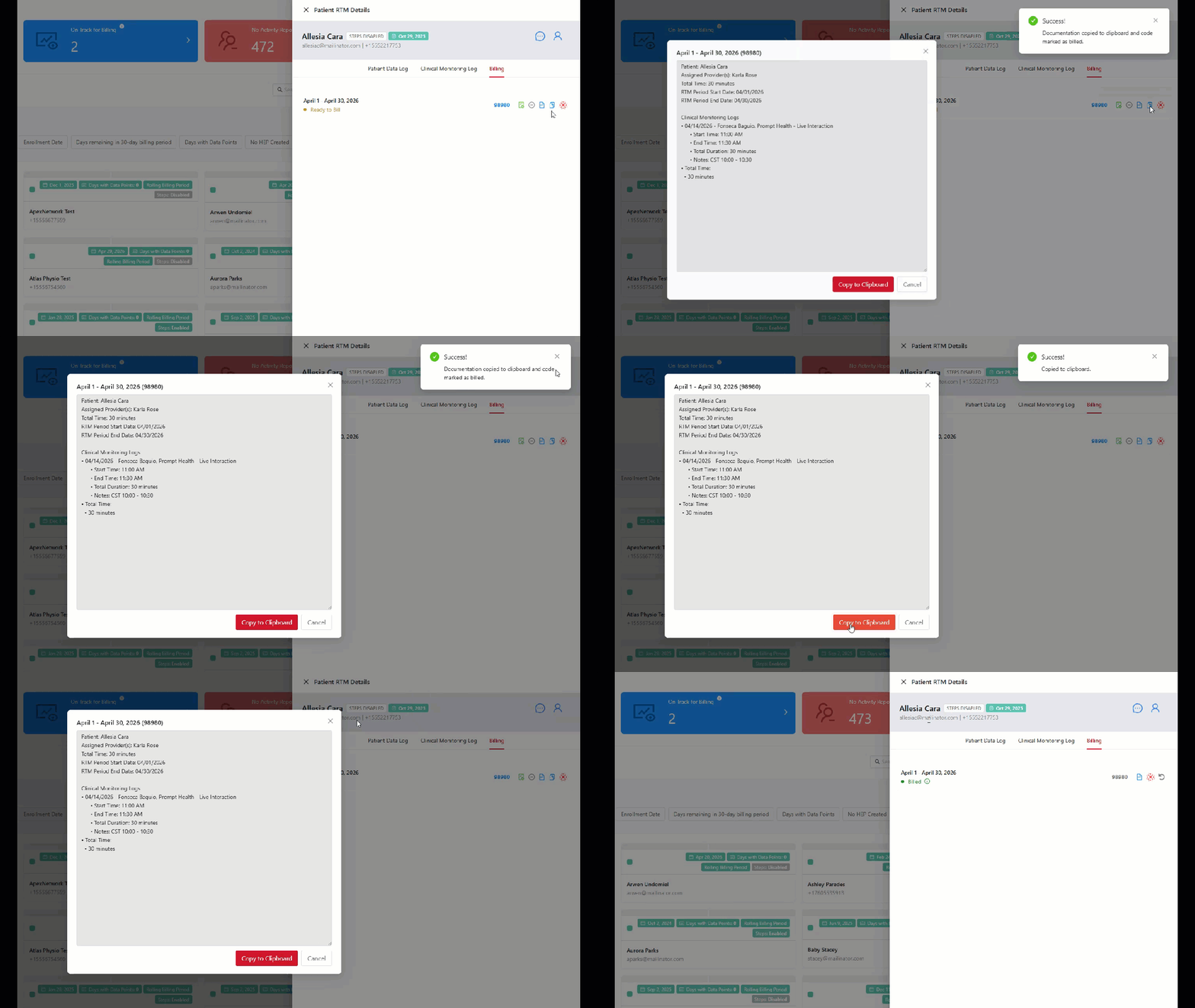
When an RTM Code is ready for billing, how can I access to the supporting documentation and bill the RTM Code?
From the Patient RTM Details tray, go to the 'Billing' tab and look for the relevant codes you want to view the documentation:
-
Click the 'View Supporting Documentation' button, then select 'Copy to Clipboard'. Finally, paste the documentation to your EMR.
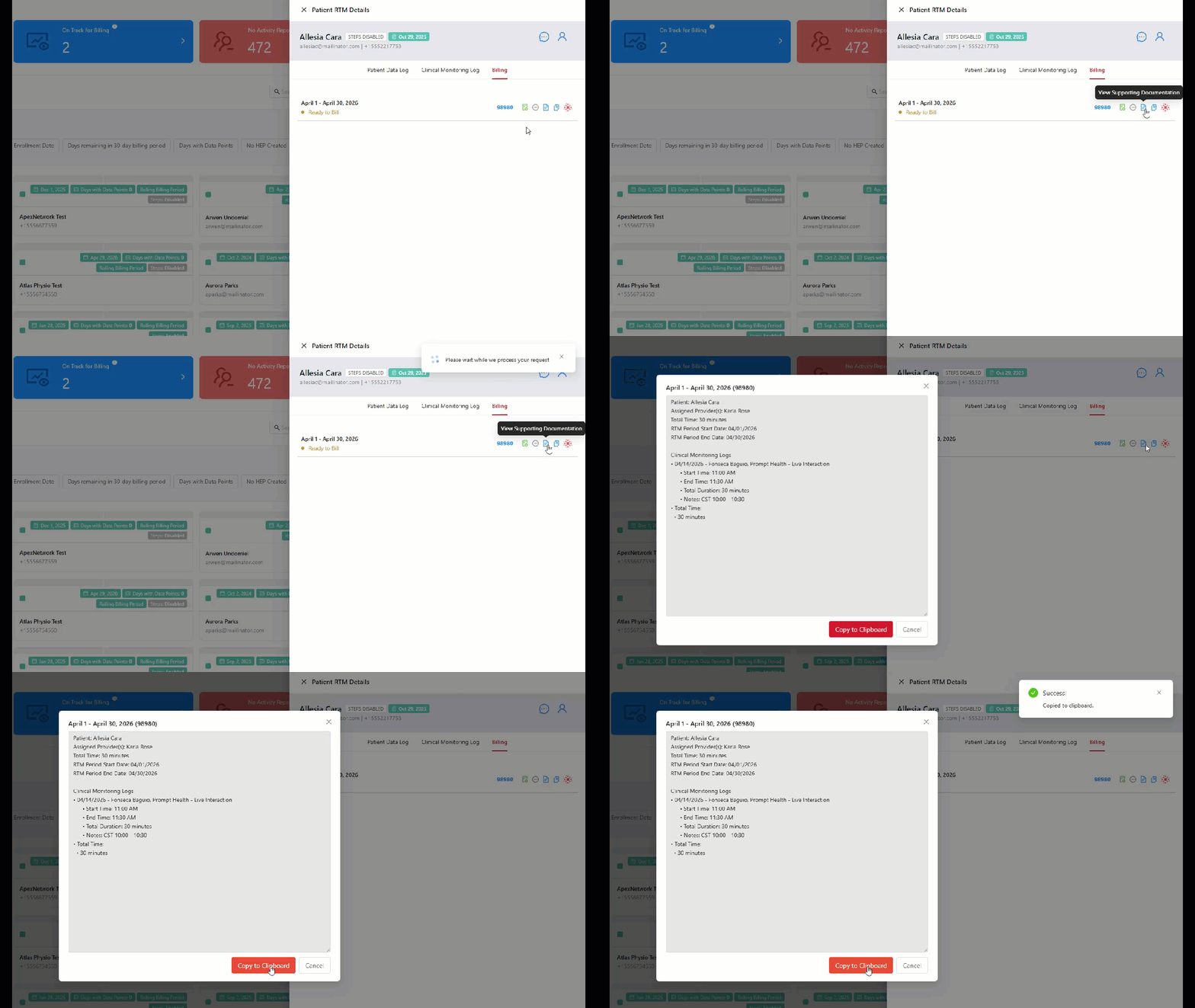
For billable codes, you can easily view the supporting documentation and mark the code as billed at the same time by using the 'Copy to Clipboard & Mark as Billed' button.
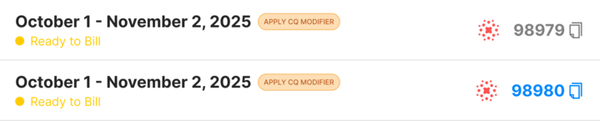
A CQ Modifier indicator on the Billing tab will appear when a CQ modifier is required for RTM codes 98980, 98981, 98975 and 98979.
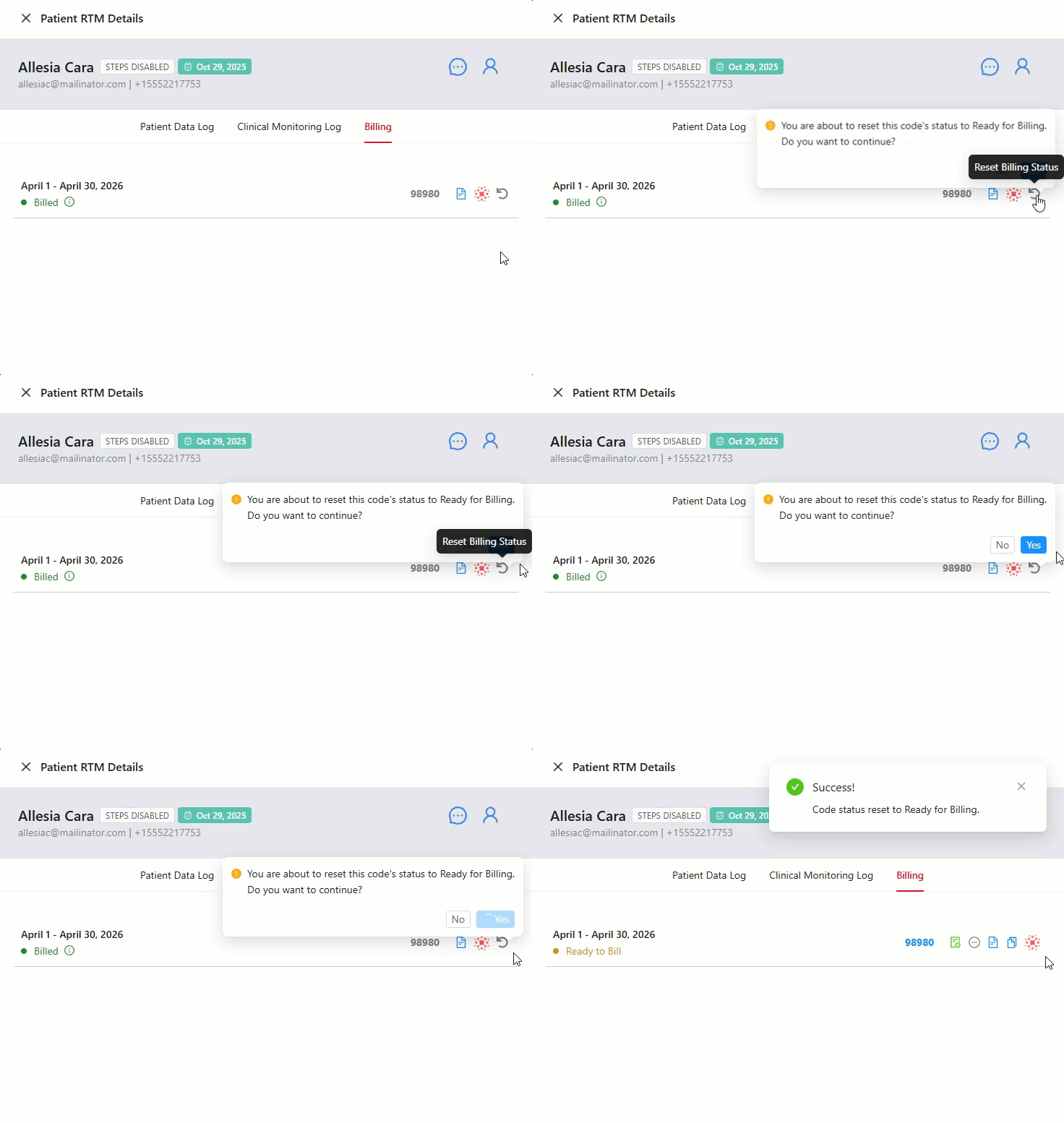
Once a code has been successfully billed, the status will change from 'Ready to Bill' to 'Billed'. If you wish to reset the billing status of the code, or un-bill the code, simply click on the undo arrow to Reset the Billing Status and then select 'Yes' to continue.
A pop-up will appear notifying you that you have successfully billed or unbill an RTM code.
When to Bill the RTM Codes?
- 98975: Bill code 98975 as soon as code requirement is met. You can add CPT 98975 to any visit occurring after the second day of the active Plan of Care. Once per episode of care.
- 98985: As soon as it is no longer possible to hit 16 days of data points within a 30 day period - though 2+ data points have been met.
- 98977: As soon as the patient has collected data points on 16 days out of the 30 day period; once per 30 day period.
- 98979: Bill code 98979 as soon as the code requirement is met and if you think you won't be able to hit requirement for codes 98980 & 98981.
- 98980: Bill code 98980 as soon as the code requirement is met if you think you won't be able to hit requirement for code 98981.
- 98981: billed multiple times per calendar month, as soon as any additional 20 minute blocks of RTM service time has been accrued by the provider.
- 98980 & 98981: These codes must be billed together. If billed separately, code 98981 will be denied. To avoid this, we recommend waiting until the end of the month to bill 98980. This allows providers to verify if they have met the requirements to bill 98981, ensuring both codes can be submitted together. Another option would be to bill 98980 when it becomes eligible, then do an addendum to add 98981 when the requirements are met later in the month.
CQ Modifier – When and How It Should Be Applied
The CQ modifier is used to indicate that a Physical Therapist Assistant (PTA) furnished all or part of a service under the direction of a Physical Therapist (PT).
Correct application of the CQ modifier is critical for billing compliance and accurate reimbursement.
The 10% (De Minimis) Standard
- Medicare applies a 10% de minimis standard to determine when the CQ modifier is required.
- The CQ modifier must be applied only when the PTA provides 10% or more of the total service time for a specific CPT code.
How It Works
- PTA provides less than 10% of total service time → ❌ CQ modifier NOT required
- PTA provides 10% or more of total service time → ✅ CQ modifier REQUIRED
Example
| Total Service Time | PTA Time | Percentage | CQ Required? |
|---|---|---|---|
| 10 minutes | 0.2 min | 2% | ❌ No |
| 10 minutes | 1 min | 10% | ✅ Yes |
| 20 minutes | 2 min | 10% | ✅ Yes |
| 20 minutes | 1 min | 5% | ❌ No |
The 10% calculation is performed per CPT code, not across the entire visit.
CPT 98975 (Initial Setup & Patient Education)
- This is an untimed code
- It is subject to the de minimis policy
- If the PTA (or OTA) provides more than 10% of the service, the CQ/CO modifier is applied to the single unit billed
Even though 98975 is untimed, the 10% rule still applies to determine whether assistant involvement must be reported.
Important: CPT 98977 and CPT 98985 (Device Supply Code)
- Not subject to the de minimis standard
- CQ modifier does not apply based on time thresholds
This code represents device supply and is not evaluated under the 10% rule.
Time-sensitive Billable RTM Codes Email
Providers will receive a time-sensitive email for billable RTM codes 3 days before the end of the month.
In the below image, the date the email was received is September 27th, and contains a message reading:
"You have met the requirements to bill RTM codes ... but have not yet marked the codes as "Billed" in Prompt Engage.
We are nearing the end of the calendar month. To avoid any billing difficulties, we highly recommend billing these codes before the end of the month."
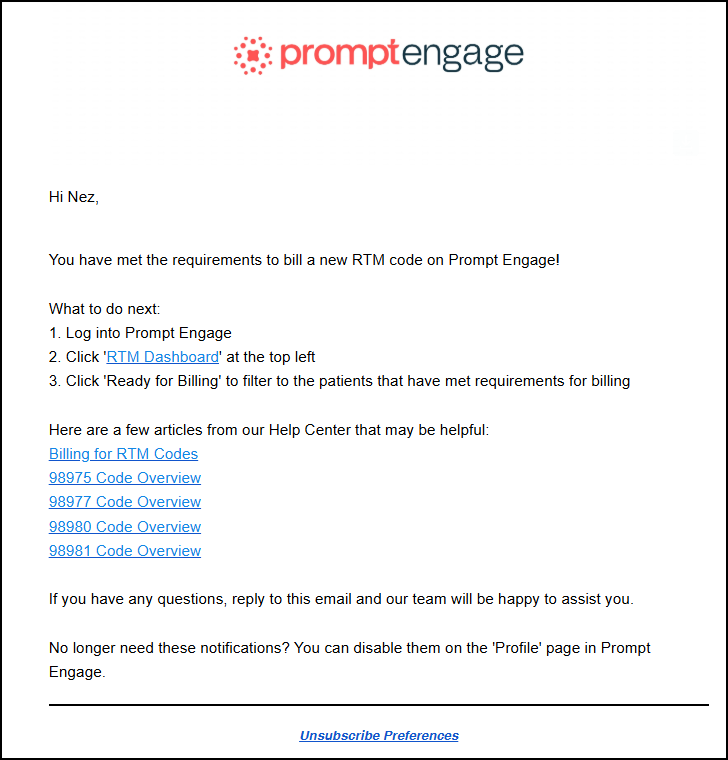
The email also contains instructions on what to do next, as well as links to our Help Center articles on Billing RTM Codes and the specific codes that can be billed.
Notes:
- If the CQ modifier is needed that will reduce the reimbursement by 15%.