
3.33 — 🎉New Features: Case-Level Patient Data Structure and Group Messaging! Improvements, Bug fixes and much more!
New Major Features 🚀
- Web App Features
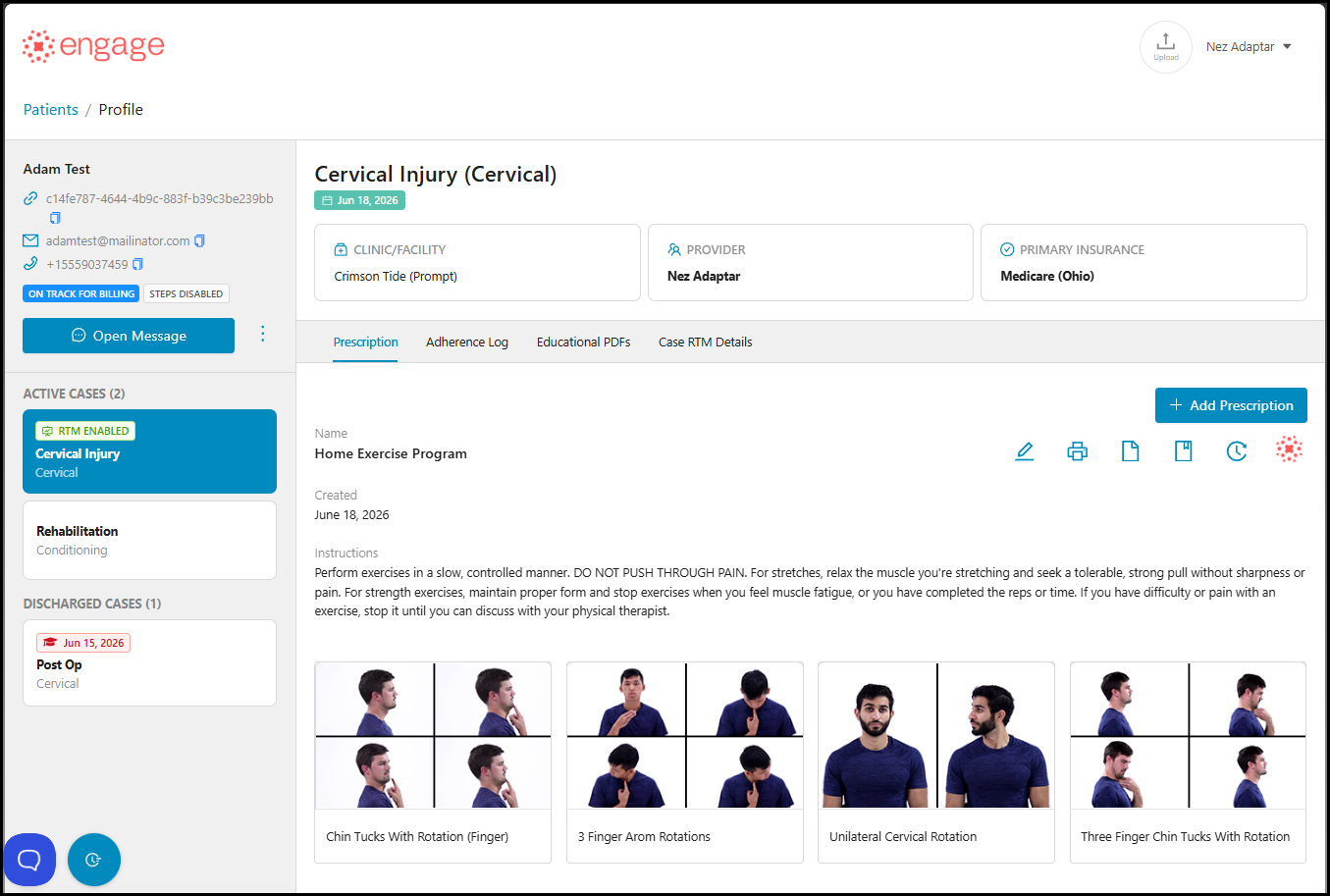
- Patient Profiles - Introduced Case-Level Architecture: Organized patient information, RTM, and Home Exercise Programs (HEPs) by individual cases for all new Prompt-integrated patients.
- Patient Profiles - Introduced Historical Case Views: Added support for viewing active and previous clinical cases directly within a patient's profile to preserve access to past records.
- RTM Billing - Introduced Past Case RTM Tracking: Added support for viewing historical RTM billing information, keeping original codes and billing statuses accessible for reference after a case is discharged or disabled.
- Patient Profiles - Introduced Active Case RTM Status: Added a dedicated RTM Billing Status indicator directly under the active case profile view for immediate visibility into the current billing cycle.
-
RTM Dashboard - Introduced Insurance Data Visibility: Added patient Primary and Secondary Insurance carrier names directly to the main RTM Dashboard columns.
- Web App - RTM Reports - Introduced Case Data in Reports: Added detailed case information to RTM reports to easily distinguish billing data across multiple episodes of care for the same patient.
- Web App - RTM Dashboard - Introduced Unbilled Code Alerts: Added a tracking indicator to highlight remaining unbilled RTM codes on eligible cases, prompting quicker provider reviews.
- Shared Messaging - Introduced Cross-Provider Collaboration: Providers can now search for other team members to temporarily view and reply to their message threads on the Web App without altering patient assignments, changing notification scopes, or affecting mobile layouts
- The Shared messaging feature is only available upon the group's request.


Web App Improvements
- RTM Dashboard - Improved Dashboard Filtering: Automated the removal of patients from the active RTM Dashboard view once their case is inactive, keeping current lists clean while archiving historical data.
- HEP Management - Improved HEP management after discharge: Ensured that HEP access remains functional for patients following case discharge unless manually turned off via the standard enable/disable toggle.
- RTM Enrollment - Improved Enrollment Logic: Adjusted the RTM enrollment start date to align with the first HEP assignment date rather than the case creation date, preventing premature billing periods.
- Case Management - Improved Facility and Provider Mapping: Optimized the interface to dynamically display facility and provider details based strictly on the parameters of the active case.
- Integration UI - Improved HEP Interface: Updated the UI to properly support legacy cases and case-level tracking within the Prompt integration.
- RTM Dashboard - Introduced Column Toggle: Providers can now show or hide the RTM Code In Progress column in the List View via the Customize List modal.
- Reports - Improved Reporting Labels: Updated the reporting module label from "HEPs Assigned" to "HEPs Created" to accurately reflect system metrics.
- Integration Login - Improved Auto-Login Flow: Added a profile selection screen when multiple patient profiles share the same identifier during auto-login from the EMR.
- Integration Setup - Improved Subdomain Mapping: Providers can now correct mismatched branding or incorrect subdomain mappings during the initial integration setup process.
Web App Bug Fixes
- Patient Search - Fixed Search Logic: Corrected the search logic to ensure all matching patients populate completely when searching by initial letters.
- Patient Data - Fixed Loading Errors: Resolved an issue where a patient mapped to an incorrect group caused an infinite loading state on their Adherence Log and Prescription views.
- Patient Creation - Fixed Patient Creation: Corrected an issue that prevented new patient profiles from being successfully created.
- HEP Creation - Fixed Text Orientation: Corrected a UI bug where prescription names displayed backwards during typing and remained backwards after assignment.
- Prescription History - Fixed History Tracking: Ensured that the name of the user who made updates in the Treat and Flow tab is properly displayed in the Prescription History.
- Exercise Assignment - Fixed Loading Screen: Resolved a bug that caused providers to encounter an infinite loading modal when assigning exercises.
- Fixed Parameter Syncing: Resolved an issue where removing or zeroing out default exercise parameters in the EMR did not persist and would incorrectly repopulate during sync.
- Patient Profiles - Fixed Profile Modification: Resolved a bug that prevented profile modifications and displayed an unexpected "0" for legacy patient accounts.
- Patient Notifications - Fixed Notification Consolidation: Reinstated the 30-minute padding window to prevent multiple immediate emails when clicking the HEP button consecutively.
- Messages - Fixed Patient Visibility: Resolved an issue where patients remained in the provider's message list after the provider unassigned themselves from the patient.
- Shared Messaging - Fixed Toggle Visibility: Corrected an issue where the Shared Messaging feature remained visible to providers even when the administrative toggle was turned off.
- RTM Dashboard - Fixed Dashboard Filtering: Corrected dashboard filters to ensure patients marked as RTM disabled are excluded from the view.
- RTM Data - Restored Historical Data: Resolved an issue where pre-March RTM billable codes and historical data were missing from the system.
- RTM Billing - Fixed Code Population: Corrected the billing logic so that RTM codes 98980 and 98981 only populate on the final calendar day of the month when the Final-Day Billing toggle is active.
- RTM Billing - Fixed Code Import: Resolved an issue that prevented providers from manually or automatically importing RTM code 98975 via the Treat and Flow tab.
- RTM Billing - Fixed Plan Billing: Resolved a billing null error to allow processing of RTM codes from past Plans of Care even after data logs are cleared for a new enrollment.
- RTM Reports - Resolved Data Mismatch: Corrected a reporting discrepancy between the RTM Billed Codes report and the RTM Codes Billed by Providers report.
- RTM Billing - Fixed Auto-Population: Corrected a bug where RTM codes 98975 and 98980 failed to auto-populate despite patients meeting all underlying tracking requirements.
- RTM Billing - Resolved Logic Population: Concluded investigation and corrected the underlying billing logic to prevent CPT code 98979 from prematurely populating prior to the final day of the month.
- Account Settings - Fixed Location Saving: Resolved an error that prevented providers from saving RTM and clinic locations when a patient was associated with multiple accounts.
Version 3.33.85 - July 18, 2026
- RTM Reports (Web): Fixed a mismatch issue with billed codes.
- RTM Clinical Monitoring: Resolved an issue where log notes were not saving when editing an existing entry.
- RTM Billing: Updated the RTM billing tab to display items in ascending order.
- RTM Dashboard: Fixed a bug where the Live Interaction Status was failing to update.
- RTM Dashboard: Corrected an issue causing "RTM Time Remaining" to display as "NaNm" and show inconsistent data.
- RTM Reports: Fixed an issue where the Assigned Provider column appeared empty for all RTM patients.
- Patient Profiles (Web): Resolved a bug that prevented users from saving changes to patient profiles.
- RTM Reports: Corrected a bug where the Assigned Provider filter was improperly selecting deactivated providers.
- Educational PDF: Resolved an issue where searching for Educational PDF Handouts caused the portal to crash.
Mobile App Bug Fixes
- IOS - Fixed Step Counting: Resolved an issue where steps taken between the last login date and the latest login date were not being accurately counted.
- Web App + Mobile - Feedback Tool - Corrected Button Visibility: Fixed a UI rendering issue where the feedback button was invisible on Android and entirely missing on iOS.
- iOS - Fixed Login Bypassing: Corrected the authentication flow to ensure the one-time password (OTP) is properly bypassed when a user logs in within one hour of a password reset.
- iOS - Fixed Progress Updates: Corrected an issue where weekly-frequency exercises completed on Sundays or Mondays failed to update progress indicators or properly display completion statuses.
- iOS - Fixed Authentication Prompts: Resolved an issue where a one-time password (OTP) was incorrectly triggered on a trusted device when a user opted to log in using a password instead of Face ID.
- iOS - Updated Contact Copy: Corrected the discharge notification display by removing outdated email support text and directing users to contact their assigned clinic directly.
- Android - Fixed Screen Stability: Resolved a UI layout issue where opening an exercise caused the screen to automatically slide downward, pushing the title and video off-screen.
- Android - Fixed Language Visibility: Resolved a UI rendering issue where the Language option would not appear in the settings menu unless the user closed and reopened the app.
- Android - Fixed Settings Persistence: Resolved a bug where the Daily Outcome Score (DOS) toggle would visually revert to disabled after being enabled by the user.