
3.36 - 🎉New Features, Fixes & Improvements | Release Notes
New Features 🎉
- Added a new configuration toggle that allows organizations to track code 98975 after receiving at least two data recordings, instead of requiring two full days of monitoring past the activation date based on interpretation preference.
-
RTM Dashboard View Customization: Added Inactive Patients filter - Providers can now easily sort between active and inactive patients easily using the 'Hide patients with more than four weeks of inactivity' customization option to reduce clutter.
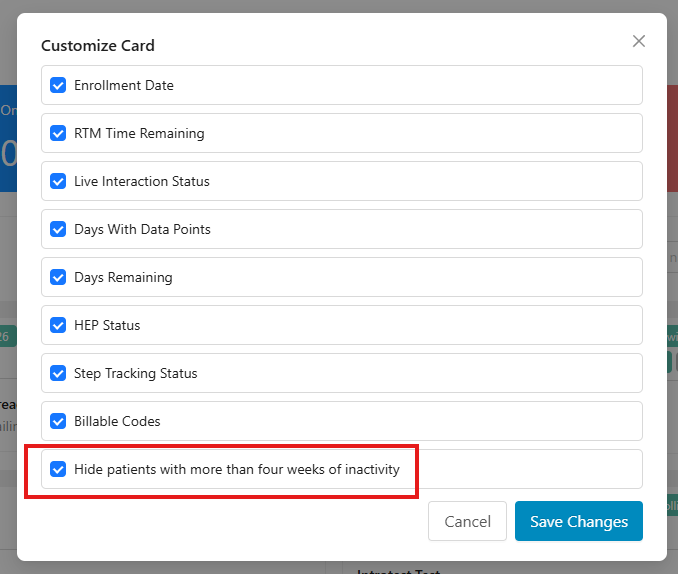
📌Note: Patients with billable codes & no HEPs assigned will still be displayed even if they are inactive for 28 days.
- Remote Therapeutic Monitoring (RTM): Introduced Immediate Code Generation for 98979 & 98985 - Discharging a patient directly in the Engage app now immediately creates eligible billing codes (98979 and 98985), eliminating month-end delays.
⚠️Note: Discharging a case in Prompt EMR will not trigger this automatic code generation.
- Provider Search, Flexible Thread Participation, and Leave Thread Functionality - Added front-end search functionality in the Provider Messages tab, allowing providers to view and join message threads for unassigned patients as guest participants. Guest participation allows providers to send replies and leave threads at any time without altering patient assignments, changing notification preferences, or triggering email/push alerts.
📌Note: Provider search and shared message thread access are available on the web app for groups with Enabled Thread/Shared Messaging feature only, and are not supported on the mobile app.
-
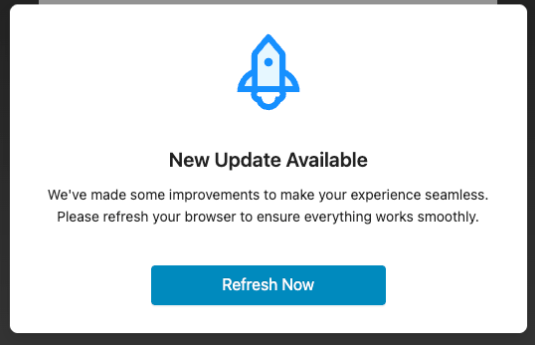
Web App - Added Version Refresh Prompt - Introduced an automatic update that alerts users when a new app version is available. A persistent banner will notify users to refresh your browser so you're always using the latest version and features without experiencing system errors.
Improvements 🛠️
- For Groups with Thread/Shared Messaging Enabled: Improved Guest Messaging Experience - Guest providers actively viewing a patient conversation now receive real-time message updates without needing to manually reopen the thread.
- HEP Creation: Improved Exercise Editor Navigation - Clicking next in the prescription builder now automatically positions providers at the top of the Prescription Details section rather than retaining the middle-of-page scroll position.
- RTM Dashboard: Improved Dashboard Performance - Optimized the RTM Dashboard to resolve severe loading slowdowns and prevent browser "unresponsive" warnings, ensuring smooth navigation and fast loading.
Bug Fixes 👾
Provider Web App & Usage Reports:
- Usage Reports - Selecting a single Facility in the Patients Added and HEPs Created usage reports now correctly filters by that Facility only.
- HEP Created Reports: Corrected HEP Creation Metrics - Fixed an issue where provider HEP creation totals were undercounted or overcounted due to how HEP’s were created in Prompt Treat & Flow or later edited.
- Fixed Patient Account Updates - Resolved an issue where providers could not add or update email addresses for patient accounts that shared a phone number across Prompt EMR and Engage. Providers can now successfully save and update patient contact details without encountering error messages.
- Resolved Provider Assignment - Resolved an issue where deactivated providers remained assigned to patient profiles. Deactivated providers are now automatically removed from the assigned provider tab, leaving the list empty if no other active providers are assigned.
- Resolved PDF Upload Failures - Fixed an issue that prevented educational PDFs from uploading and saving successfully when adding them as group PDFs or through clinic settings.
- Resolved Messaging Notification Leak - Fixed an issue where providers who were removed from a patient's Assigned Providers list continued to receive automated email notifications for that patient.
- Resolved Prescription Edit Assignment - Fixed an issue where editing a prescription in Engage does not update the Assigned Providers list, ensuring patient accounts now display the correct providers.
Remote Therapeutic Monitoring & RTM Reports:
- RTM Codes per Patient Report: Corrected Filter Date Shifts - Fixed an issue in the "RTM Codes per Patient" report where applying custom filters caused the Ready for Billing and Billed dates to display one day earlier than expected.
- RTM Codes Billed per Patient Report: Corrected Report Fields - Fixed an issue where the RTM Codes Billed per Patient report would sometimes inaccurately display the correct billed date timestamp and provider information.
- Resolved Monthly 98979 Computation - Resolved a bug where code 98979 would occasionally not populate in real-time at month-end once clinical monitoring requirements were met.
- Resolved Historical Code Generation - Fixed a bug that prevented past-month 98979 codes from generating when all monitoring requirements were satisfied
- Corrected Enrollment Date Shift - Fixed a bug that caused RTM enrollment dates to display one day ahead due to time zone differences. When you toggle RTM directly in Engage, the date now matches the provider's local device time. If RTM is toggled on through Prompt EMR, the date is recorded in Eastern Time (EST), which may show as the next day if done late at night in earlier time zones.
- Resolved Missing Eligibility Indicator - Resolved an issue where the blue "i" indicator icon did not appear on the patient card after a patient reached two data points.
- Resolved Dashboard Unresponsiveness - Fixed an issue where opening the RTM tab caused the browser page to freeze or crash, allowing the dashboard to load normally.
- Resolved Messaging Restriction Enforcement - Fixed an issue where the message icon in the RTM Tray remained accessible for patients with disabled messaging, ensuring providers can no longer open or send messages when messaging is turned off.